A free aquarium water test log app for iPhone
Aquarium - Log Tracker is a free iPhone app for logging water tests, water changes and maintenance for freshwater and saltwater tanks. No account needed.
If you want an app to log your aquarium water tests, this is the one I built: Aquarium - Log Tracker, free to download for iPhone, with no in-app purchases, subscription or ads. It records ammonia, nitrite, nitrate, pH, temperature and whatever else your kits measure, plus water changes, maintenance and livestock, for freshwater and saltwater tanks, one or several. It works fully without an account.
I build it on my own. Here's what it does and doesn't do.
Why keep a log of aquarium water tests?
One test tells you where the tank is today. A log tells you which way it's going: nitrate creeping up between water changes, alkalinity swinging, a heater that sticks. When something dies, last week's readings are what explain it.
It matters most while a new tank cycles. Fish waste and leftover food break down into ammonia; bacteria in the filter turn it into nitrite, then nitrate, which builds up until a water change removes it. Ammonia and nitrite are toxic to fish, nitrate much less so. You see the cycle only by testing often and writing it down.
While a tank cycles, Aquarium shows which stage the readings point to and flags the usual reasons a cycle stalls, such as alkalinity running out. It calls the tank cycled after two sessions in a row with ammonia and nitrite clear and nitrate present, because one clean result can be a misread.
How do I log a water test?
The Log tab sits in the middle of the tab bar and opens on your last tank. Every parameter that tank tracks is on one page, with your previous values in grey as a starting point. It takes about twenty seconds, one-handed.
A field you leave blank stays blank. It is never stored as zero, because "I didn't test that" and "it was zero" are different facts, and a log that mixes them up draws trends that never happened. Each parameter has its own timer for the wait between reagent and reading, and several can run at once.
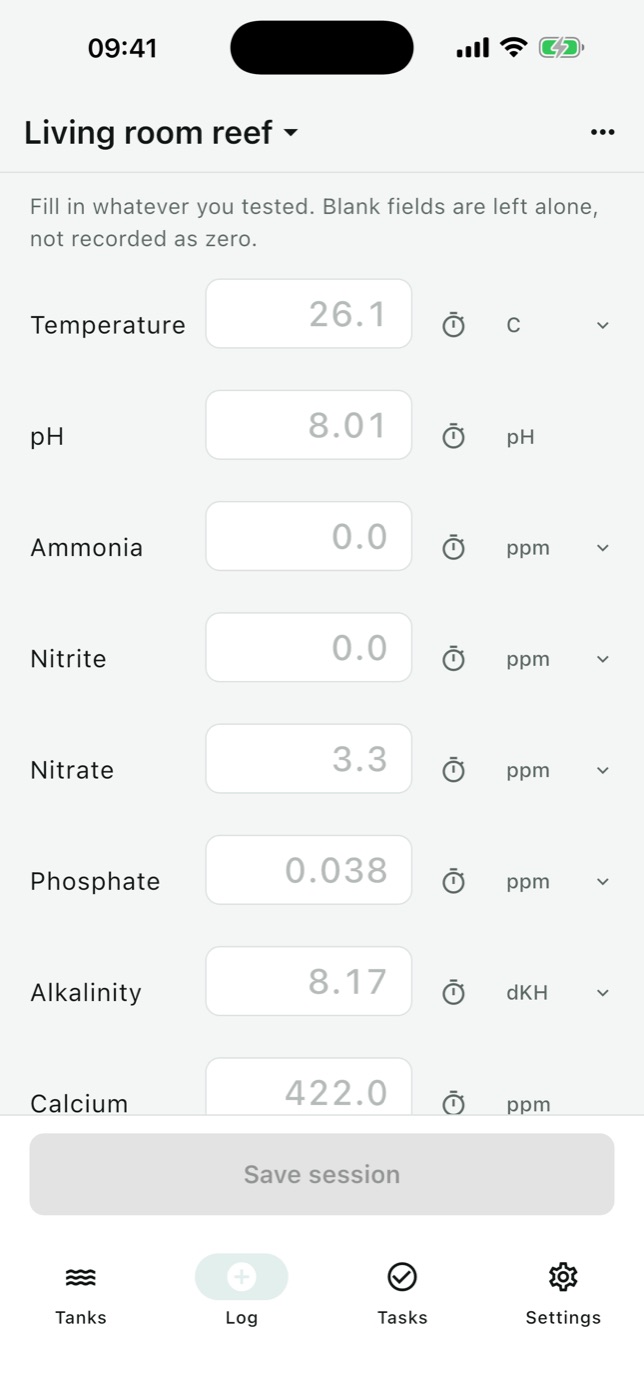
After you save, it works out free ammonia. Your kit reads total ammonia, but the part that harms fish is un-ionised ammonia (NH3), and its share depends on pH and temperature: the higher the pH, the larger it is, roughly ten times larger at pH 8 than at pH 7. The app uses the pH and temperature from the same session and says where the result sits. The same screen flags readings outside the tank's target band and parameters moving faster than they should.
Units follow your kit, per parameter: nitrate as NO3 or NO3-N, alkalinity as dKH, meq/L or ppm.
Can it track water changes, maintenance and livestock?
Yes:
- Water changes. Enter the volume or the percentage and it fills in the other. It compares the new water's temperature and salinity with the tank's, since a mismatch can shock the fish.
- Reminders for water changes, testing, filters, media, dosing, feeding and equipment, across every tank. Late still counts, and Skip is recorded as an answer. They're scheduled on the phone, so they fire without signal.
- Livestock and equipment: what went in and when, what left and why, what's running and when it was last serviced. Losses are marked on the charts.
- Journal and photos, on the same timeline as the readings.
- Care sheet for a tank sitter and a help summary of recent tests to paste into a forum, both plain text.
Can I track more than one tank?
Yes, as many as you keep, at no cost. There are seven tank types, from freshwater community, planted and shrimp to brackish, fish-only saltwater and two kinds of reef. The type sets which parameters you're asked to test and their starting target bands: calcium and magnesium for a reef, hardness and TDS for shrimp. You can switch parameters off and change bands, but can't add others. The Tasks tab shows every tank together.
How do I see trends in my water parameters?
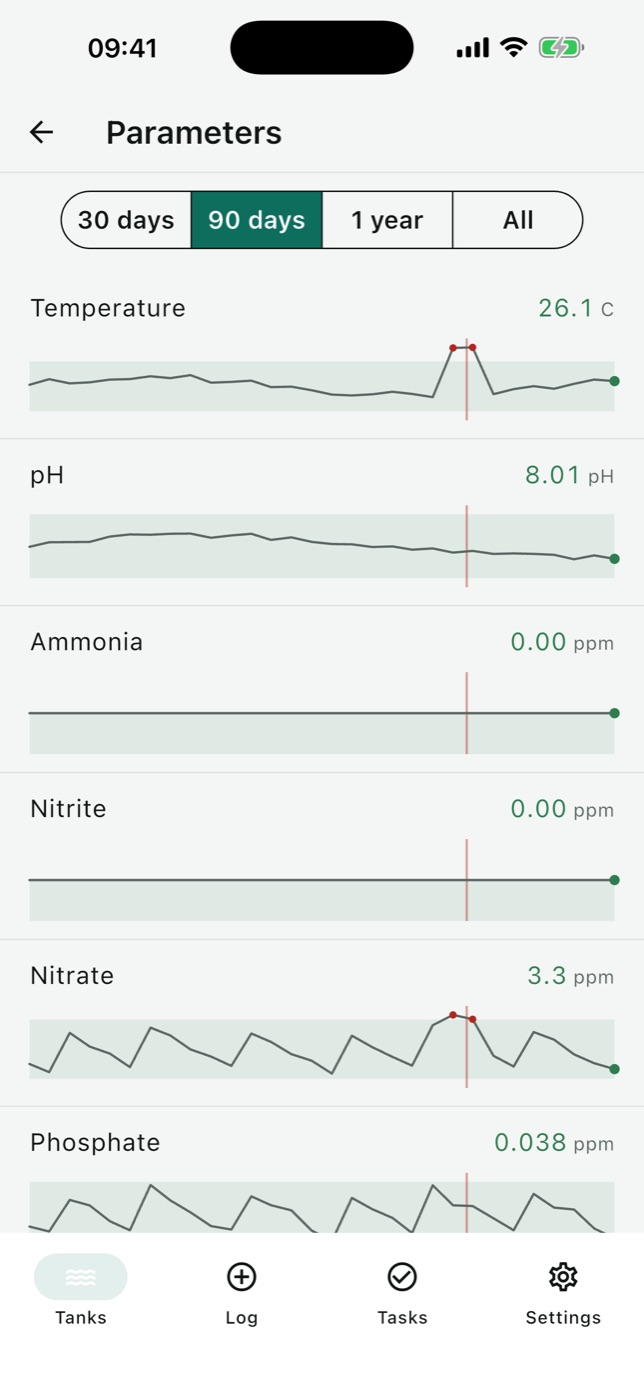
The chart icon on a tank shows every parameter on one shared time axis, over 30 days, 90 days, a year or everything. Each keeps its own scale and shaded target band, and losses are drawn as a line across all of them. In the demo data below, a heater stuck, the temperature spiked and a coral died the same week.
Tap a parameter for its full history. Any reading can be edited, date and time included, which is how you'd copy in an old paper log. A parameter not tested within its interval is flagged as stale.
Where is my aquarium data stored?
- Signed out, everything lives on your iPhone and nothing is sent anywhere.
- Signed in, with email or Sign in with Apple, your log and photos are also stored on Supabase so they reach your other devices. Each account can only read its own rows.
- Every save goes to the phone first and is queued for sync, so logging works with no signal. No analytics, no ads, no tracking.
- Settings → Export gives you everything as CSV and JSON, free, with or without an account.
- Settings → Account → Delete account removes everything the server holds. The copy on the phone stays until you delete the app.
Who it's for, and who it isn't for
It's for anyone who tests their water and wants the numbers in one place, from a first tank still cycling to a reef or several tanks.
It isn't for you if:
- You're on Android or iPad. It's iPhone only, iOS 13 or later, in English.
- You want readings to fill themselves in. Every value is typed: no test-strip camera, no probes.
- You want stocking advice. Livestock is a list you write, with no species database or compatibility checks.
- You have years of readings elsewhere. There's no import; readings can be backdated one at a time.
- You want a diagnosis. It records, flags and does the ammonia arithmetic. It doesn't diagnose sick fish or replace an experienced keeper or a vet.
How to get started
- Install Aquarium - Log Tracker from the App Store.
- Tap Add your first tank: name, type, volume, and whether it's cycled.
- Tap Log, fill in what you tested, save. Leave the rest blank.
- Match the units to your kits in Settings → Units.
- Add reminders on the Tasks tab. Sign in only if you want the log on another device.
How it's built, for developers: Offline-first aquarium log in Flutter with Drift and Supabase.
How it compares with AquaticLog, Aquarimate, Pocket Marine, Nitrify, AquaLens and others: Aquarium water test log apps for iPhone: 8 compared.
FAQ
What's the best way to keep track of aquarium water tests?
Write down every test with its date, leave blank what you didn't test rather than writing zero, and read each parameter over weeks. Aquarium - Log Tracker is a free iPhone app that does this with charts, test timers and reminders.
Is there an app to track ammonia, nitrite, nitrate and pH in my tank?
Yes. Aquarium - Log Tracker for iPhone logs ammonia, nitrite, nitrate, pH and temperature, plus alkalinity, hardness, phosphate, calcium, magnesium, salinity and others depending on the tank type, charted on a shared time axis.
How do I know when my aquarium is cycled?
A tank is generally considered cycled when ammonia and nitrite both read zero and nitrate is present, consistently rather than once. Aquarium - Log Tracker calls a tank cycled after two test sessions in a row like that.
What is free ammonia?
Many kits report total ammonia: ammonium (NH4+) plus un-ionised ammonia (NH3). The un-ionised part is the very toxic one, and its share grows as pH rises. Aquarium - Log Tracker calculates it from the ammonia, pH and temperature in the same test session.
Can I track multiple aquariums in one app?
Yes. Aquarium - Log Tracker has no limit on tanks, freshwater or saltwater, charges nothing for extra ones, and shows maintenance for all of them in one list.
Is Aquarium - Log Tracker free?
Yes. It's free to download, with no in-app purchases, subscription or ads, and no account is needed. Exporting everything as CSV or JSON is free too.
Does Aquarium - Log Tracker work on Android or iPad?
No. It's an iPhone-only app and needs iOS 13 or later.
More writing
Aquarium water test log apps for iPhone: 8 compared
Eight iPhone apps for logging aquarium water tests compared: freshwater or reef, test strip scanning, species database, account, and what each costs.
Free parking in Madrid, Barcelona and Valencia: 7 apps compared
Most Spanish parking apps help you pay, not park free. Seven apps compared for Madrid, Barcelona and Valencia, and which one maps free street parking.
Pet health record apps for iPhone: 7 compared
Seven iPhone apps for your pet's vaccinations, vet visits and documents compared: which work without your vet joining, store your own scans, and cost.