A quiet time app and study timer that locks distracting apps
QT is a free iPhone app that starts each study session with a one-minute quiet time: one Bible verse, one line of reflection, then your chosen apps lock.
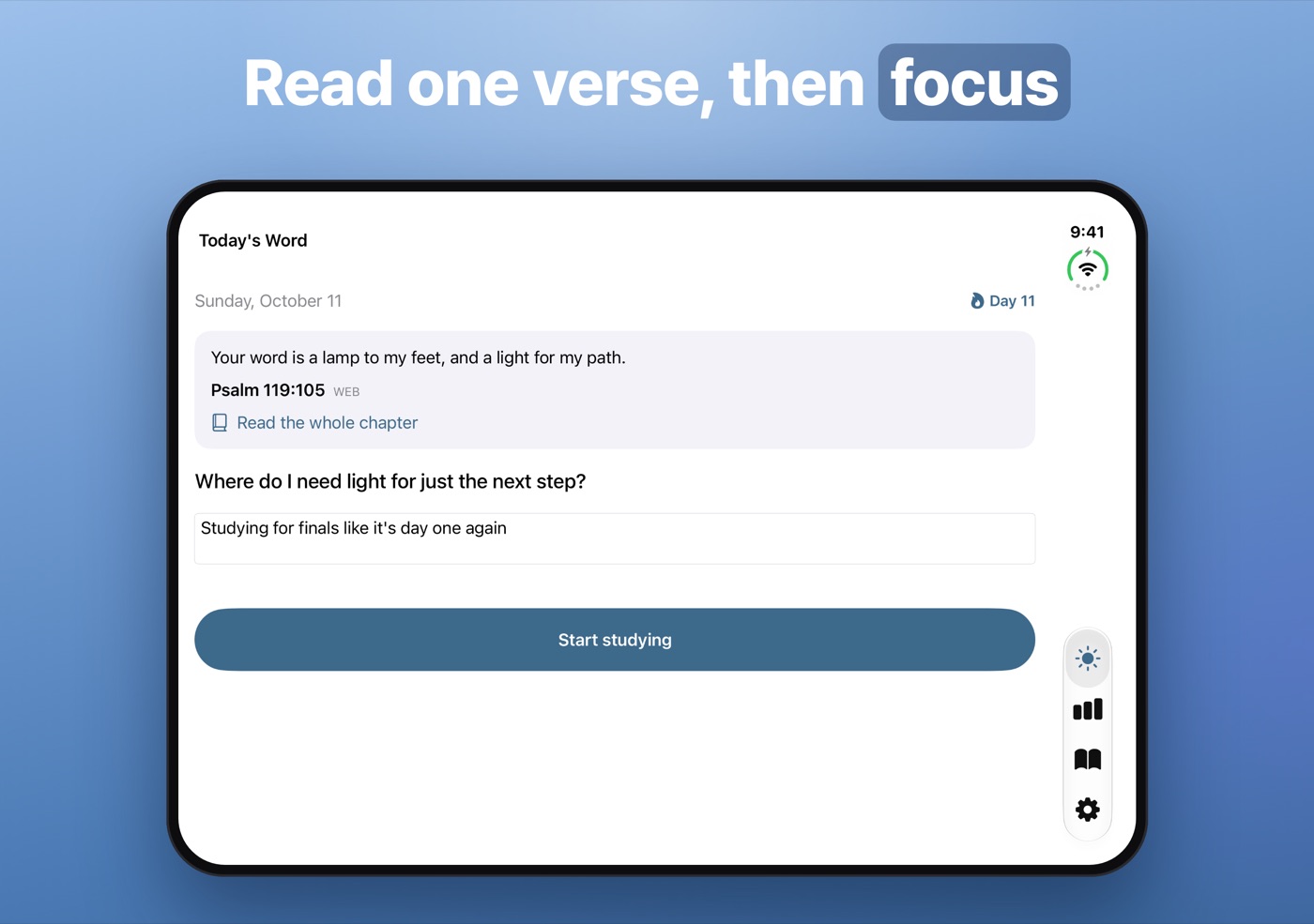
QT is an iPhone app that puts a one-minute quiet time in front of every study session. It shows one Bible verse and one reflection question, you can write a line, and then a study timer starts while the apps you chose stay locked through Apple's Screen Time. It's for students, and anyone else who wants to start work with Scripture rather than a feed; it needs iOS 17 or later and is free to download on the App Store.
QT stands for quiet time, the daily habit of time alone with the Bible; Korean churches call it 큐티. I made the app for Korean students first, and it's also in English, Japanese and Traditional Chinese.
Why does the phone win the morning?
The plan is usually a verse, then work. What happens instead is a message or a video that turns into twenty minutes, and by the time you sit down to study, the quiet part is gone.
QT ties the two habits together: the verse is the first screen, the button under it starts the study timer, and the timer locks the apps that would have pulled you away.
How does QT work?
- Read today's verse. One verse, in English from the World English Bible, with a Read the whole chapter link that opens the YouVersion Bible app or bible.com.
- Answer one question. Each day has a single reflection question and room for a line or two. Writing is optional.
- Tap Start studying. That marks today's QT as done and adds to your streak.
- Pick a subject and a length. 25, 50 or 90 minutes, or Free, where you set the time the apps open again, up to six hours ahead.
- Study. The apps you picked stay locked until the timer ends. Then they unlock on their own and the session is saved under its subject.
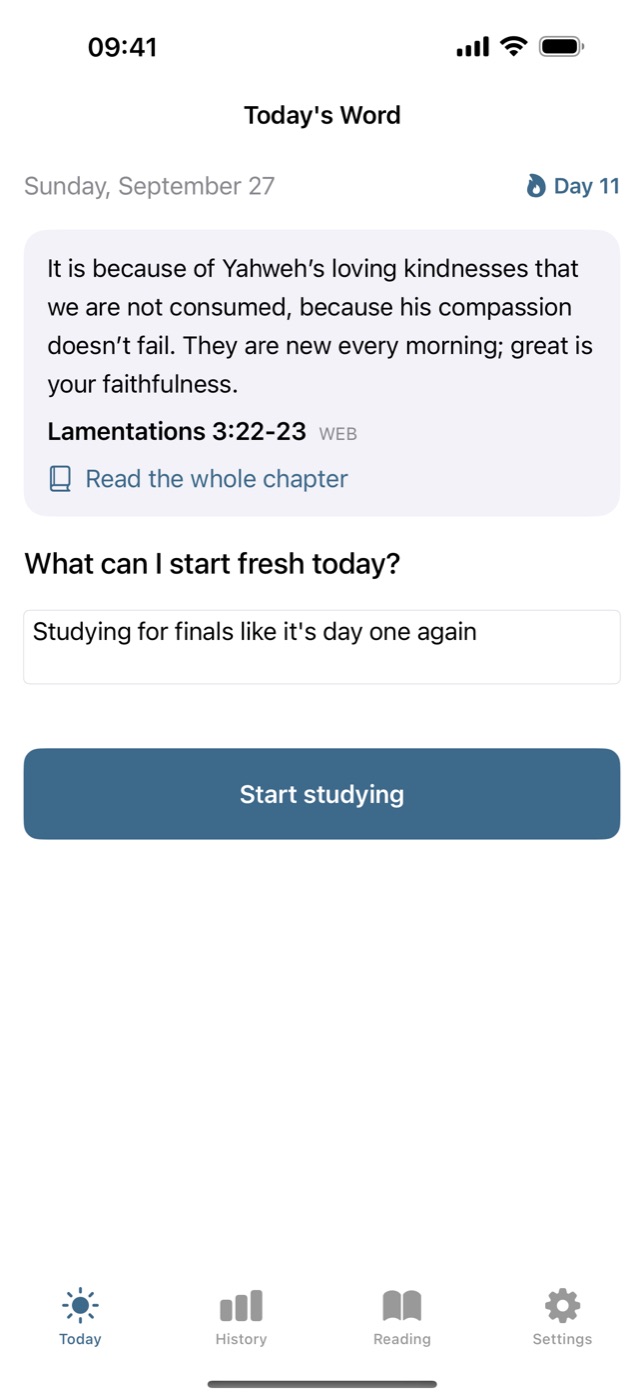
The streak forgives one missed day a week; two in a row break it. A reminder arrives at the time you choose, plus an optional one at 9 pm if the day's QT isn't done. Widgets show today's verse and your streak on the Home Screen and Lock Screen.
What does the study timer do?
It stores when a session started instead of counting seconds, so the time holds up if the app closes, the phone goes offline or it restarts. While a session runs, a Live Activity shows it on the Lock Screen and in the Dynamic Island.
History shows today, this week and totals by subject: English, Math, Science, History and Other to start with, plus your own. Every session has a six-hour cap, so a forgotten timer is saved and closed rather than left running.
Reading has one plan, the New Testament in 90 days: you read in your own Bible and tick the days off.
What gets blocked, and how do you get past it?
Only the apps you pick, and only during a session. You choose them in Apple's Screen Time picker, as single apps or whole categories. Open one mid-session and iOS covers it with a screen saying you're studying and when it unlocks, with one button: Go back. You can't end the session from there. Inside QT you can:
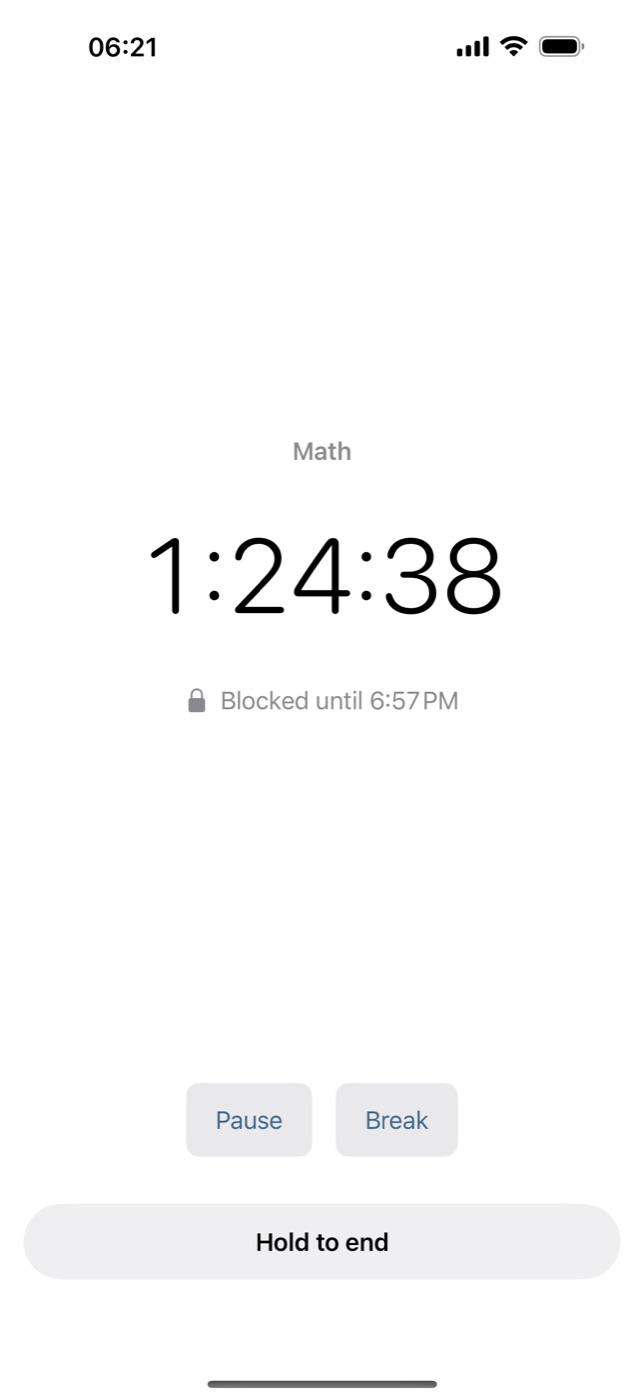
- Break: the clock stops and the apps unlock until you tap Resume. Breaks have no time limit.
- Pause: the clock stops, the apps stay locked.
- Hold to end: hold the button for three seconds to finish.
The lock lives in iOS, not in the app, so closing QT doesn't lift it. At the planned end, iOS runs a small part of QT that lifts the lock without the app open.
It's a speed bump, not a vault: turning off QT's Screen Time access or deleting the app removes the lock. It locks apps, not individual websites. The free version locks one app or category; QT Pro removes the limit.
What does QT know about you?
Only what stays on your phone; none of it reaches me. The App Store privacy label reads "Data Not Collected": no account, no ads, no analytics. Sessions, reflections, reading progress and settings are stored on the device, and deleting the app deletes them. Settings → Export reflections gives you your lines as text.
For blocking, Apple hands QT opaque tokens instead of app names. QT can count them, which is how the free limit works, but can't tell which apps they are or how much you use them. Reminders are local notifications and purchases go through Apple. The only thing that goes online is a chapter you open in YouVersion or on bible.com, under their own privacy policies.
On a child account in Family Sharing, app locking needs a parent's approval.
Who it's for, and who it isn't for
It's for students who want study to start with a verse rather than a feed, and for anyone who works in timed blocks and keeps losing them to the phone.
It isn't for you if:
- You're on Android. QT is built for iPhone, on iOS 17 or later.
- You want a Bible study app. QT shows one verse and one question, not commentary, audio or a full reader.
- You want apps locked until you've read the Bible. The lock belongs to the study timer; outside a session nothing is locked.
- You want a lock you can't break. Break and Hold to end are always there.
How to get started
- Install QT - Bible & Study Timer from the App Store.
- Go through the intro screens: allow Screen Time access when iOS asks, then pick a reminder time and allow notifications.
- In Settings → Apps to block, choose what to lock. Free covers one app or category; Pro, any number.
- On Today, read the verse, write a line if you like, tap Start studying, choose a subject and a length, and tap Start.
QT is an independent app, not affiliated with Apple or YouVersion.
FAQ
What is a quiet time app?
A quiet time app supports the daily habit of time alone with the Bible, often called QT or a devotional: a short passage, a question to think about and a place to write. QT on iPhone keeps it to about a minute, one verse, one question and one line, then starts a study timer.
Is there a study timer that blocks distracting apps on iPhone?
Yes. Timers built on Apple's Screen Time can lock chosen apps while a session runs. QT does this for 25, 50 or 90 minutes or until a time you set, then unlocks them. It's free, with one locked app in the free version.
Is there an app that locks my phone until I read the Bible?
QT comes close but works the other way round. You read one verse, then start a study session, and the session is what locks the apps you choose. Reading doesn't unlock anything, and outside a session nothing is locked.
Is QT free?
Yes. The daily QT, the timer, locking one app, the reading plan and the widgets are free, and there are no ads. QT Pro removes the limit on how many apps can be locked; in the US it costs $4.99 a month, $29.99 a year or $89.99 once.
Which Bible translation does QT use?
In English, QT uses the World English Bible, a public-domain translation that says Yahweh where many Bibles print "the LORD". The Korean edition uses 개역한글, the Japanese 口語訳 and the Traditional Chinese 和合本. The whole chapter opens in the YouVersion Bible app or on bible.com.
Can QT see which apps I block or what I write?
No. Apple's Screen Time gives QT opaque tokens, not app names, and your reflections and study history are stored only on your phone. There's no account, and the App Store privacy label reads "Data Not Collected".
What happens if QT closes during a study session?
The session continues. QT stores when it started rather than counting seconds, so the time is right when you reopen it, and iOS lifts the lock at the planned end without the app open.
Does QT work on Android or iPad?
QT is built for iPhone and needs iOS 17 or later. There is no Android version and no iPad version.
More writing
Aquarium water test log apps for iPhone: 8 compared
Eight iPhone apps for logging aquarium water tests compared: freshwater or reef, test strip scanning, species database, account, and what each costs.
Free parking in Madrid, Barcelona and Valencia: 7 apps compared
Most Spanish parking apps help you pay, not park free. Seven apps compared for Madrid, Barcelona and Valencia, and which one maps free street parking.
Pet health record apps for iPhone: 7 compared
Seven iPhone apps for your pet's vaccinations, vet visits and documents compared: which work without your vet joining, store your own scans, and cost.