Counting reps with Vision and locking apps with Screen Time
How I count push-ups from Vision body pose with one state machine, and what Screen Time's shields, monitor callbacks and 20-activity limit really allow.
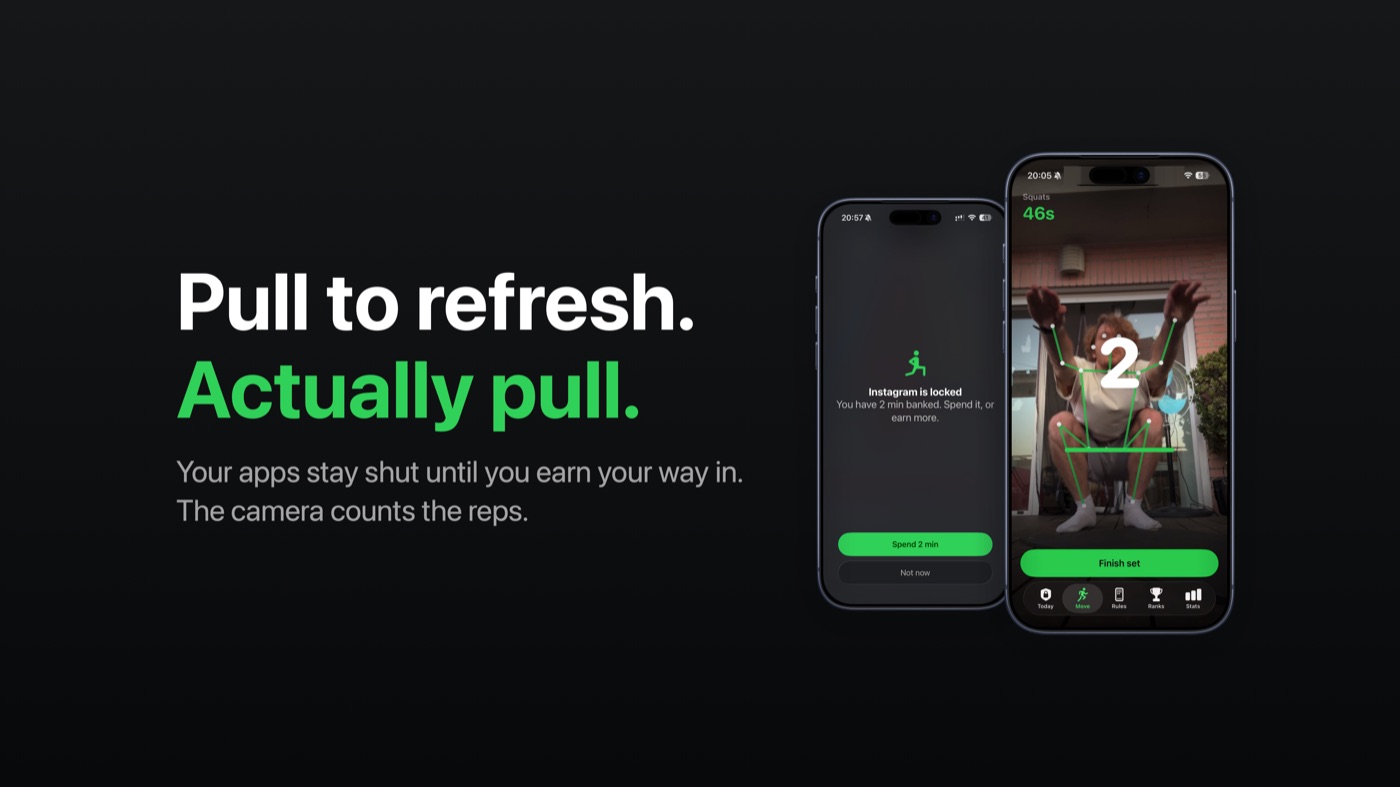
Pull to Refresh is my iPhone app that locks the apps you choose and unlocks them for exercise reps counted by the camera (App Store). This is the developer side: counting reps from Vision joint positions, what Apple's Screen Time API lets a third-party app do, and the bugs that taught me both. What the app does for its users is in the user-facing post.
One number per exercise, one state machine
VNDetectHumanBodyPoseRequest
runs on every frame of a 1280×720 front-camera feed. I keep joints with a
confidence of 0.3 or more and drop the frame; nothing is recorded.
What kept the counter small: every exercise reduces a pose to one Double,
oriented so that low means contracted and high means extended. Push-ups, squats
and sit-ups use a joint angle, averaged over both sides of the body when both
are visible. Pull-ups and jumping jacks use the nose's height against the
wrists, divided by torso length, so standing further back doesn't change the
number.
One state machine then scores all five; each exercise supplies two thresholds and a speed limit:
| Exercise | Signal | Contracted | Extended | Min. gap |
|---|---|---|---|---|
| Push-up | elbow angle | 100° | 150° | 0.7 s |
| Squat | knee angle | 110° | 160° | 0.7 s |
| Sit-up | shoulder–hip–knee angle | 80° | 120° | 0.7 s |
| Pull-up | hands above nose, in torsos | 0.0 | 0.35 | 1.0 s |
| Jumping jack | nose above hands, in torsos | 0.0 | 0.8 | 0.4 s |
The gap between the thresholds is the hysteresis: the phase flips to
.contracted below contracted, and a rep counts only on the way back above
extended:
case .contracted:
    if value >= model.extended {
        phase = .extended
        let now = sample.timestamp
        if let last = lastRepAt, now.timeIntervalSince(last) < model.minRepInterval {
            return .formHint("Slow down — that one didn't count.")
        }
        lastRepAt = now
        reps += 1
        return .counted(reps)
    }
The raw value is smoothed first (smoothed + 0.35 * (raw - smoothed)), because
joints jitter between frames. A third line, 35% of the way down, catches
half-reps: dip past it and come back without reaching depth, and you get a
hint to go deeper instead of silence. Up to eight frames of missing joints
pass before the screen says it can't see you.
The tests drive the counter with synthetic geometry: a pose builder that produces an exact elbow angle, swept through a cosine at 30 fps. Ten clean push-ups must give 10, half-reps 0 and a hint, and twenty 0.2-second cycles, someone shaking the phone, at most 4. Not zero: smoothing and the speed floor limit how fast reps pay, but nothing recognises shaking as such.
One dead end. I saw zero reps on a screenshot from the start of a squat set, decided a knee angle can't be read head-on and moved squats to a side view. Later frames of that set were counting fine. I reverted it the same day and fixed the setup hint instead, which had been asking people to stand side-on in front of the selfie camera. Now every exercise opens on the front camera, so the person doing the reps can see the count.
Five targets and an App Group
Screen Time work is split across processes that can't call each other. The app
picks apps with FamilyActivityPicker and gets opaque tokens, never names. A
DeviceActivityMonitor extension wakes when an interval starts or ends or a
usage threshold is crossed. Two shield extensions draw the lock screen and
handle its buttons. A
DeviceActivityReport extension
is the only process that sees per-app usage, and it can only render a SwiftUI
view: the app shows a "minutes left" card without ever learning the numbers.
They share state through App Group UserDefaults, plus a Darwin notification to
tell a running app something changed. Each rule has its own named
ManagedSettingsStore, so rules shield and lift independently. The monitor is
handed nothing but an activity name, so the name carries the context:
static func make(_ kind: ActivityKind, rule: UUID, slot: Int = 0) -> DeviceActivityName {
    DeviceActivityName("\(kind.rawValue)|\(rule.uuidString)|\(slot)")
}

var decoded: (kind: ActivityKind, rule: UUID, slot: Int)? {
    let parts = rawValue.split(separator: "|", omittingEmptySubsequences: false)
    guard parts.count == 3,
          let kind = ActivityKind(rawValue: String(parts[0])),
          let id = UUID(uuidString: String(parts[1])),
          let slot = Int(parts[2]) else { return nil }
    return (kind, id, slot)
}
Two documented limits shape everything: an app and its extensions can monitor twenty activities, and an interval can't be shorter than fifteen minutes. Schedules repeat daily, not hourly, so "five minutes an hour" costs one registration per hour of its window. Windows are capped at 16 hours, and one slot always stays free for unlocks.
Callbacks are not transitions
Up to 1.4 the code did the obvious thing: intervalDidStart lifts the shield,
the threshold puts it back. The docs for
startMonitoring
say callbacks may arrive as soon as you call it if the interval is running.
Saving a rule re-registered every budget, the registration echoed
intervalDidStart, and the shield came down. And unless an event opts into
counting past activity, which needs iOS 17.4, it counts usage only from the
moment it's registered, so a save handed a spent allowance back in full.
Stopping an activity echoes intervalDidEnd, so switching a schedule off
mid-lock shielded the rule I'd just been told was off.
The fix was to let no callback decide. Each one hands the rule, as it is now,
to one apply, which asks a pure policy function whether it should be open:
override func intervalDidStart(for activity: DeviceActivityName) {
    super.intervalDidStart(for: activity)
    guard let decoded = activity.decoded, decoded.kind != .grant, decoded.kind != .warning,
          let rule = SharedState.rule(id: decoded.rule) else { return }
    // A fresh allowance, a schedule's boundary, or registering this
    // activity echoing straight back. Lifting outright here is what let
    // every save reopen an allowance already spent.
    ShieldEngine.apply(rule)
    StateBridge.postChanged()
}
That works because of a record: when a threshold fires, the monitor writes down
that the allowance is spent for the current day or hour, so an echo finds the
rule spent and keeps it shut. A save now registers only the rule saved, and
only when something iOS enforces changed. From iOS 17.4, budgets pass
includesPastActivity: true
and count the whole day or hour however late they're registered.
Earned time is a one-shot activity whose event threshold is the time bought. The threshold counts use of those apps, so putting the phone down doesn't burn paid minutes. The interval end is a backstop: four times the unlock, between 30 minutes and 22 hours. It's registered before anything is stored or lifted; 1.4 did it the other way round, so a refusal at the twenty-activity limit left the rule open with nothing to close it. And unlock records once lived in one array that three processes read and wrote whole, so one could resurrect an unlock another had just ended. Each record has its own key now.
From the shield back into the app
The shield's button belongs to the shield action extension, and for years it
couldn't launch its containing app. The only way back was a local notification,
easy to miss with a Focus on. My first version posted it and returned .close
in the same breath; closing the shield lets iOS terminate the extension, and the
notification sometimes went with it.
iOS 26.5 added
ShieldActionResponse.openParentalControlsApp.
Both paths:
SharedState.setPendingUnlock(targets.map(\.id))

if #available(iOS 26.5, *) {
    // Straight into the workout screen, with the rule already chosen.
    completionHandler(.openParentalControlsApp)
    return
}

// Closing the shield lets iOS terminate this extension, so the
// request has to be handed over before that happens.
Task {
    await notify(title: title, body: body, ruleID: carriedRule)
    completionHandler(.close)
}
The pending unlock goes into the App Group first, so the app opens on the workout screen and spends the next set on that rule. With a minute already banked, the button just spends it. The new case needs the iOS 26.5 SDK, so CI moved to macOS 26 runners. On older iOS with notifications off there's no way back, and the app warns about it.
None of it ships without com.apple.developer.family-controls. The development
entitlement comes without asking and TestFlight worked with it; distribution is
by request, and
Apple's page
says to file the same request for every Screen Time extension.
Pricing a rep
A clean rep earns 10 seconds for a jumping jack, 20 for a squat or sit-up, 30 for a push-up and 90 for a pull-up. Steps move the rate (×1.15, ×1.3, ×1.6 at 3,000, 8,000 and 15,000), each streak day adds 0.05 up to eight, and the total caps at ×2. The rate locks when a set starts.
I started with "only reps buy time", and a test asserts no number of steps pays a second without a rep. Then a user asked for a way in for people who can't do a push-up today, so an opt-in mode now lets 1,000 steps buy 3 minutes, up to 30 a day, with steps dropped from the multiplier so one walk is paid once. HealthKit reports a running total, so what today already paid is subtracted, and a total that drops never takes minutes back.
Steps typed into Health by hand don't count. My first predicate for that summed to zero for everyone:
// Must be a negated match, not a "not equal to" match.
let typedIn = HKQuery.predicateForObjects(
    withMetadataKey: HKMetadataKeyWasUserEntered, allowedValues: [true])
let notTypedIn = NSCompoundPredicate(notPredicateWithSubpredicate: typedIn)
A not-equal match only considers samples that carry the key, and step samples from an iPhone or Watch don't.
None of this is unbreakable: deleting the app removes every lock, and a camera can be fooled.
What the app does for the people who use it: App blocker you unlock with push-ups: Pull to Refresh.
FAQ
Can you count push-ups with Apple's Vision framework?
Yes. VNDetectHumanBodyPoseRequest returns shoulder, elbow and wrist positions
per frame, and the elbow angle follows from them. Pull to Refresh counts a
push-up, on the device, when the angle drops below 100° and comes back above
150°, with smoothing and at least 0.7 seconds between reps.
Can a Screen Time shield open the app that blocked it?
From iOS 26.5, yes: a ShieldActionDelegate can answer with
ShieldActionResponse.openParentalControlsApp. Before that, the fallback is a
local notification, and the extension should wait until the request is added
before calling its completion handler, or iOS may end it first.
How many DeviceActivity schedules can an iOS app monitor at once?
Twenty, across the app and its extensions; past that, startMonitoring throws
excessiveActivities. Each interval must last at least fifteen minutes, and since
schedules repeat daily, an hourly allowance needs one activity per hour.
Can an iOS app read how long someone used another app?
Not directly. Per-app usage goes only to a DeviceActivityReport extension,
which can render a SwiftUI view from it but can't pass the numbers back. Apps
arrive as opaque tokens, not names.
Does the Screen Time API work in the iOS Simulator?
No. FamilyControls, ManagedSettings and DeviceActivity have no Simulator implementation, so authorization fails and no shield appears. You need a physical iPhone.
Do Screen Time extensions need their own Family Controls entitlement request?
Yes. Apple's documentation says to submit the same distribution request for each Screen Time extension: Device Activity Monitor, Device Activity Report, Shield Action and Shield Configuration.
More writing
Aquarium water test log apps for iPhone: 8 compared
Eight iPhone apps for logging aquarium water tests compared: freshwater or reef, test strip scanning, species database, account, and what each costs.
Free parking in Madrid, Barcelona and Valencia: 7 apps compared
Most Spanish parking apps help you pay, not park free. Seven apps compared for Madrid, Barcelona and Valencia, and which one maps free street parking.
Pet health record apps for iPhone: 7 compared
Seven iPhone apps for your pet's vaccinations, vet visits and documents compared: which work without your vet joining, store your own scans, and cost.