Sourdough planner apps that work back from bake time: 7 compared
Seven iPhone sourdough apps compared: which plan backwards from when you want bread, adjust for kitchen temperature, keep steps out of the night, and cost.
If you want an app that tells you when to feed your starter, mix and bake so the bread is ready at a set time, five of the seven iPhone apps below do it: Proofday, Sourdough Planner (Bulk Planner), BreadMe, BackPlaner and Dough Timer. They differ on three things that decide whether the plan survives your kitchen: whether it adjusts for temperature, whether it keeps steps out of the night, and whether it lets you bring your own recipe. I built Proofday, so weigh that, but each section below says where another app is the better pick.
The short version:
- Planned around temperature and sleep: Proofday.
- One-off price, bread and pizza: Sourdough Planner ($2.99).
- Your own recipes, several bakes on one day: BackPlaner (free).
- A simple backward timer: Dough Timer (free).
- Your recipes plus starter reminders: BreadMe ($2.99).
- Starter tracking and loaf feedback, no schedule: Loaflo (free download).
How the seven apps compare
| App | Plans back from a ready time | Adjusts for kitchen temperature | Keeps steps out of the night | Own recipes | Price (US) |
|---|---|---|---|---|---|
| Proofday | Yes | Yes, and learns from your bakes | Yes, quiet hours | No, 8 built-in | Free download; $39.99/year after a 7-day trial |
| Sourdough Planner | Yes | Room temperature is an input | Not mentioned | Saved formulas | $2.99 once |
| BreadMe | Yes | Not mentioned | No | Yes, shareable | $2.99 once |
| BackPlaner | Yes, several bakes at once | Not mentioned | Yes, shows a night-free window | Yes | Free download |
| Dough Timer | Yes | No | No | Edit step durations | Free |
| Bread Boss | Shift alarms by hand | No | No | Yes, baker's formulas | $5.99 once |
| Loaflo | No | No | No | Recipes and calculators | Free download |
Everything here comes from each app's App Store listing in November 2026; "not mentioned" means the listing doesn't say. I left out two apps that AI answers still recommend, Crumb and Levain, because I couldn't find either on the App Store any more.
What a sourdough planner has to get right
A bake runs a day and a half, and three things move the clock.
- The starter's peak. It goes into the dough near its peak, and that depends on the feed ratio and the warmth of the jar.
- Temperature. Bulk fermentation is chemistry: a common rule of thumb, and the one Proofday uses, is that every 7 °C (about 13 °F) cooler roughly doubles the time. A plan built for 24 °C (75 °F) runs hours late at 18 °C (64 °F).
- The night. Count back from Saturday breakfast and the folds land at 3 AM unless something stretches. The cold proof in the fridge is the usual buffer, because it can run anywhere from about 8 to 24 hours.
An app that only subtracts fixed durations from your ready time gets the arithmetic right and the bread wrong on a cold day. That's the main thing to check before you rely on one.
Proofday: built around temperature and sleep
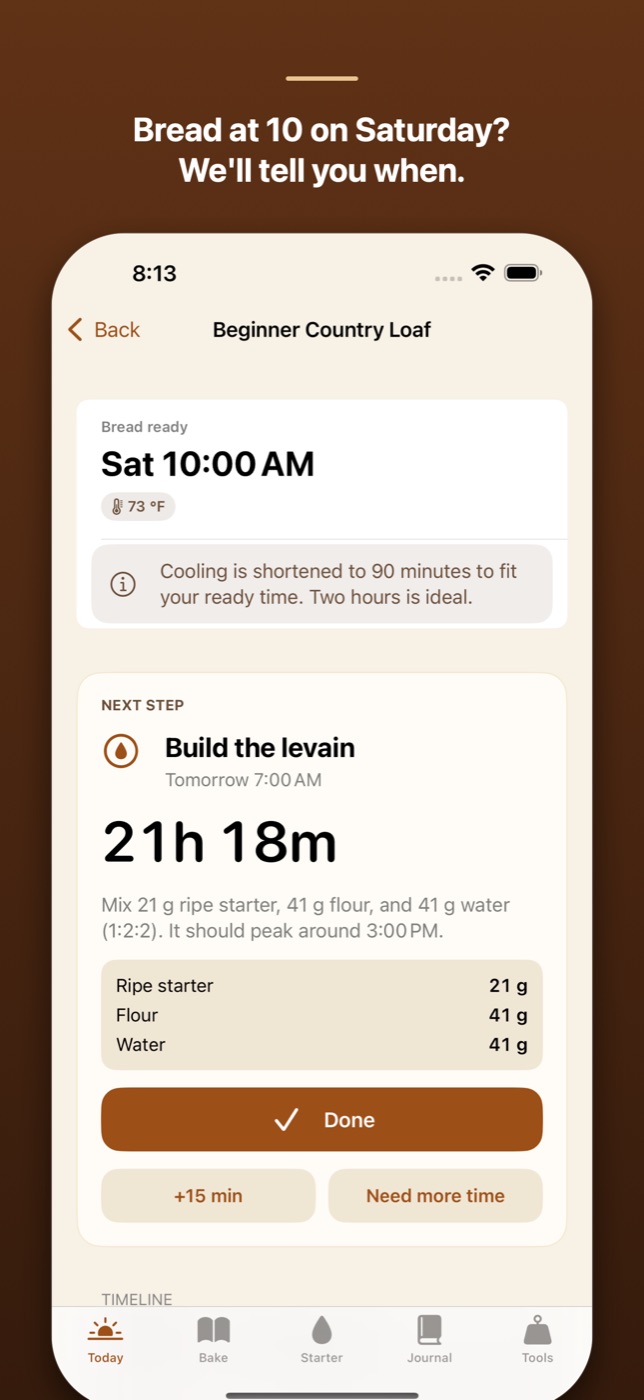
Proofday plans backwards from "bread ready Saturday at 10" and adjusts every step for your kitchen temperature. Hands-on steps stay out of your quiet hours (11 PM to 7 AM by default): it stretches the cold proof, or switches to a slower overnight starter feed, to bridge the night. Ask for a time that can't work and it says why and offers the nearest one that can.
It predicts when your starter will peak from the feed ratio and temperature, measures rise from photos of the jar, and tunes both to your kitchen after a few bakes. During the bake there's a reminder for every step with Done, +15 min and Snooze on the Lock Screen, a Live Activity countdown, and "Need more time" to push the rest of the plan.
Limits: no recipe editor yet (you choose from eight built-in recipes), iPhone only, English only, and after the first planned bake it needs a subscription: $39.99 a year after a 7-day free trial, or $6.99 a week.
Sourdough Planner (Bulk Planner): one price, bread and pizza
Sourdough Planner, which calls itself Bulk Planner inside, takes a target bake time, dough style, room temperature, starter timing and cold-proof path, and builds the schedule backwards. It has same-day, short cold, 12-hour and 16-hour plans, a pizza path that can end in frozen dough balls, formula scaling and fresh-milled flour support, alarms, bake logs and iCloud sync.
Pick it if you want a temperature-aware backward planner for a one-off $2.99, or you make pizza dough as often as bread. It's new (first released in May 2026) and had no ratings when I checked.
BreadMe: your own recipes, scheduled
BreadMe schedules a recipe so the bread is ready when you need it, tracks progress through it, keeps your recipe collection and shares it with friends. It also tracks your sourdough starters and reminds you to feed them. It has been on the App Store since 2020 and rates 4.7 from 40 ratings.
Pick it if you bake from your own recipes and want them scheduled, for a one-off $2.99. The listing doesn't mention temperature adjustment or night hours.
BackPlaner: several bakes, and a window with no night steps
BackPlaner plans backwards from when each bake should finish and puts every step of every bake in one chronological list, colour-coded by bake, so a loaf, a flatbread and a pizza can share a day. Move one step and the later ones move with it. For long sourdough recipes it shows the window in which no step falls into your night hours, which you set. You write your own recipes with any number of steps, it scales ingredients and calculates hydration.
Pick it if you bake several things on the same day or want full control of your own recipe. It doesn't model temperature: your durations are fixed until you change them.
Dough Timer: a simple backward timer
Dough Timer takes a target finish time and calculates your start time and every stage: pre-ferment, autolyse, mix, bulk, folds, shape and proof. You can edit durations, reorder or skip stages, and follow a fold mode for stretch-and-folds, with Live Activities on the Lock Screen and Apple Watch. It's free.
Pick it if you already know your timings and just want the subtraction done and a timer to follow. It doesn't adjust for temperature or avoid the night.
Bread Boss: baker's formulas and alarms
Bread Boss turns recipes into baker's percentages, scales them, ships with sourdough recipes from a master baker, and sets alarms for each task that you can shift forward or back to fit your day. It costs $5.99 and was last updated in September 2023.
Pick it if formulas and scaling matter more to you than automatic scheduling, and you don't mind an app that isn't being updated.
Loaflo: starter tracking and AI feedback
Loaflo is the most-rated app here (4.7 from 573 ratings). It tracks starter feedings and hydration, analyses photos of your loaf or starter with AI, has recipes, calculators and a chat assistant, and needs no account. It doesn't build a schedule back from a ready time.
Pick it if you want help with the starter and feedback on your crumb more than a timetable. Some people use it alongside a planner.
How to plan a sourdough bake backwards without an app
- Pick the ready time and subtract cooling (at least an hour, two is better) and baking (about 45 minutes in a Dutch oven, plus preheating).
- Put the cold proof overnight. Shape in the evening, bake in the morning: 8 to 24 hours in the fridge absorbs most timing errors.
- Count back bulk fermentation for your kitchen. If your recipe says 5 hours at 24 °C (75 °F), expect about 7.5 at 20 °C (68 °F) and 9 at 18 °C (64 °F).
- Feed the starter so it peaks when you mix. In Proofday's model, a 1:2:2 feed peaks about 7 hours later at 24 °C, and later in a cooler kitchen.
- Watch the dough, not the clock. A small jar of dough set aside at mixing shows its rise better than the bowl does.
Which sourdough planner should you use?
- You bake one loaf at a time and your kitchen temperature changes with the season: Proofday.
- You want to pay once: Sourdough Planner or BreadMe, $2.99 each.
- You bake your own recipes or several breads on one day: BackPlaner.
- You know your timings and want a free timer: Dough Timer.
- You mostly need help with the starter: Loaflo.
FAQ
Is there an app that plans a sourdough bake backwards from when I want bread?
Yes. On iPhone, Proofday, Sourdough Planner (Bulk Planner), BreadMe, BackPlaner and Dough Timer all take a ready time and work out when to start. Proofday and Sourdough Planner also take your kitchen temperature into account; Proofday and BackPlaner keep steps out of the night.
What is the best free sourdough schedule app?
Among the apps compared here, BackPlaner and Dough Timer are free to download and both plan backwards from a finish time. BackPlaner handles several bakes at once and shows a window with no steps during the night; Dough Timer is a simpler timer with Live Activities. Neither adjusts for temperature.
Which sourdough app adjusts the schedule for kitchen temperature?
Proofday adjusts every step for the kitchen temperature you set, assuming fermentation time roughly doubles for every 7 °C (13 °F) cooler, and tunes the model to your logged bakes. Sourdough Planner (Bulk Planner) also asks for room temperature when it builds a plan.
How do I bake sourdough without getting up at night?
Put the long, flexible step at night: shape in the evening and cold proof in the fridge for 8 to 24 hours, then bake in the morning. Proofday plans this automatically around quiet hours you set, and BackPlaner shows the window in which no step falls into your night hours.
Is there a one-time-purchase sourdough planner?
Yes. Sourdough Planner (Bulk Planner) and BreadMe each cost $2.99 once on the App Store, and Bread Boss costs $5.99. Proofday is free to download but needs a subscription after the first planned bake.
Are there sourdough planner apps for Android?
The apps compared here are for iPhone. On Google Play, Sourdough Timer: Bake Planner also builds a schedule backwards from a bake time, with ads in its free version.
Is Proofday free?
Proofday is free to download, and its setup quiz plans your first bake. After that it needs Proofday Pro: $39.99 a year after a 7-day free trial, or $6.99 a week (US prices).
More writing
Aquarium water test log apps for iPhone: 8 compared
Eight iPhone apps for logging aquarium water tests compared: freshwater or reef, test strip scanning, species database, account, and what each costs.
Free parking in Madrid, Barcelona and Valencia: 7 apps compared
Most Spanish parking apps help you pay, not park free. Seven apps compared for Madrid, Barcelona and Valencia, and which one maps free street parking.
Pet health record apps for iPhone: 7 compared
Seven iPhone apps for your pet's vaccinations, vet visits and documents compared: which work without your vet joining, store your own scans, and cost.