Scan trading cards and see what they're worth with Foilcase
Foilcase is an iPhone app that scans trading cards, identifies the exact printing, prices them daily and tracks what your collection is worth. No scan limits.
Foilcase is an iPhone app that scans trading cards, works out which printing you own, and tracks what your collection is worth with prices refreshed every day. It is for TCG collectors who keep singles, graded cards and sealed product and want a total they can trust. It is free to download on the App Store, both plans start with a 14-day free trial, and scanning is never metered: no per-card counter, no credits, no scan packs.
Why the exact printing decides what a card is worth
The same card is often printed more than once: a regular print, a foil, an alternate art, a higher-rarity parallel. Some share one illustration, some even share one collector number, and their prices can differ by multiples. A scanner that only recognizes the picture can name the card and then give you the price of the wrong print.
I measured this on a test set where half the cards shared a collector number with another print. Matching the artwork picked the right print 89.5% of the time, even when it was given the correct number. One miss in ten is fine for a search box and bad for a collection total, so Foilcase never files a look-alike silently. It asks.
How the scanner identifies a card
You hold the card inside the guide on the Scan screen. Foilcase reads the artwork and the printed collector number together, on the phone, with Apple's Vision framework, and the card is identified, priced and filed in about a second.
- It adds a card on its own only when the artwork and the number agree. For a look-alike print, an alternate art or a number it couldn't read, it shows the candidates instead of guessing.
- Look-alikes are asked about once. Parallels that share an illustration are asked about and then remembered, so a playset of four is one question and four cards.
- Foil or not is never guessed. No photo reliably shows the finish, and the price depends on it, so you pick.
- Photos work too. Images picked from your library, several at a time, go through the same recognition.
When the scanner misses, search by name or collector number instead. For the best hit rate, lay the card flat, fill the guide, keep the collector number in frame, and tilt foils away from the light.
Where the prices come from and how fresh they are
Prices are collected once a day from public marketplace data, as US market prices in US dollars. Every figure carries its source and the date it was taken, and each card is valued at the price for its own finish.
Once prices are more than seven days old, the portfolio says so in its headline, with a line like "These prices are 2 weeks old", instead of showing an old total as if it were current.
Treat the numbers as estimates: a thin market can swing hard on a single sale. Price history starts on the day recording started, because nobody sells the past for these games, so the chart fills in as the days accumulate.
Raw, graded and sealed are kept apart
Raw cards, graded cards and sealed product are separate items, each with its own purchase price and condition. A graded copy and a loose one are different assets, and adding them together makes the total meaningless. Graded cards have no automatic price source, and Foilcase won't derive one from the raw price: you enter a value, or the card stays unpriced.
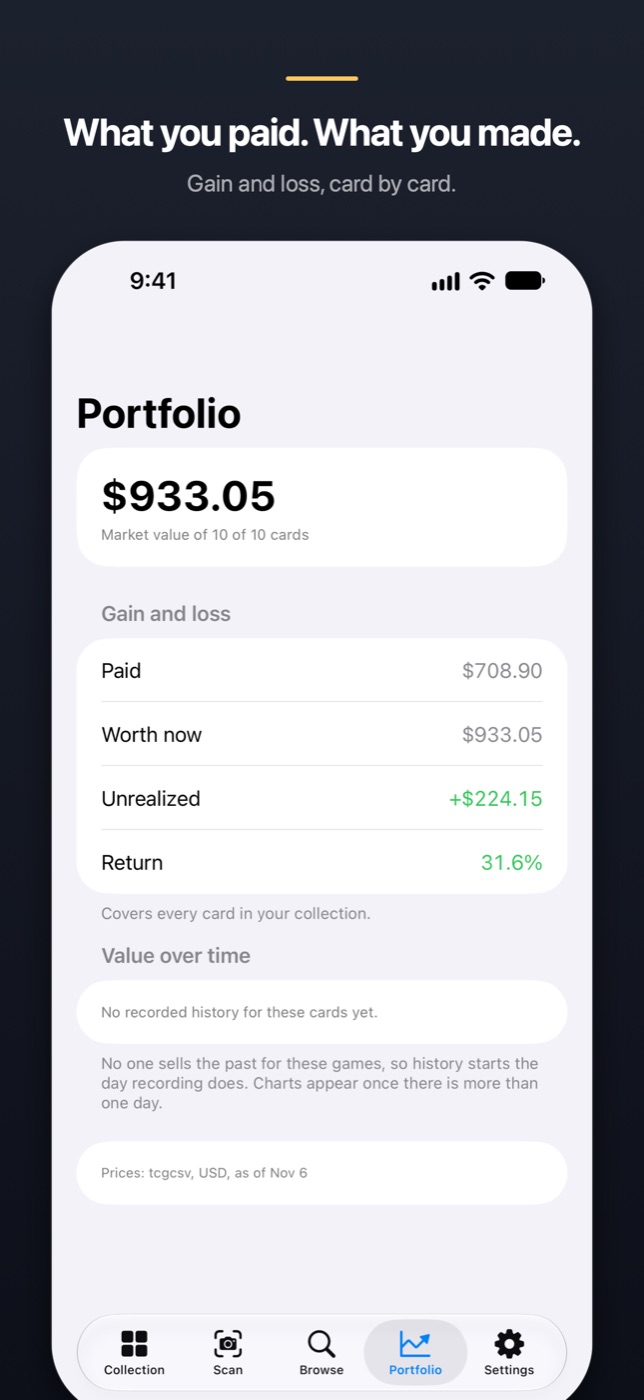
The portfolio shows paid, worth now, unrealized gain and return, per card and overall. Gain is computed only over cards that have both a purchase price and a market price, and the screen says how many cards that covers.
No account, and the collection stays on your iPhone
There is nothing to sign up for, no ads and no analytics. The App Store privacy label reads "Data Not Collected". Camera frames are processed on the phone and never saved or sent.
The collection lives on the device as an append-only ledger: every change is a new entry and nothing is overwritten, so a mis-tap is never a lost card. The network is used for card catalogs and images, a daily price file that is the same for every user, and your subscription status.
The cost: there is no cloud sync yet. The collection is included in an encrypted iPhone or iCloud device backup, but a phone lost without a backup takes it along. Sync and export are being worked on.
Who it's for, and who it isn't
It suits you if you care which printing you own, scan in volume, and want what you paid next to what a card is worth. It doesn't suit you if:
- You want a fully free app. After the trial, Pro is $7.99 a month or $49.99 a year in the US, and it unlocks the whole app.
- Your game isn't one of the five it supports. The list is on the app's first screen.
- You want condition graded from a photo, or live sold-listing comps. Neither is built, on purpose.
- You need sync between devices or an export today. Neither exists yet.
How to get started
- Install Foilcase from the App Store. It needs iOS 17 or later.
- Start the 14-day free trial, monthly or annual. To avoid a charge, cancel at least 24 hours before it ends in Settings › Apple Account › Subscriptions.
- Pick the card games you collect. Each catalog is a separate download, so this step needs a connection.
- Open Scan and hold a card in the guide with its collector number visible, or pick photos, or search in Browse.
- Answer when it asks which print, or whether a card is foil.
- Add what you paid and the condition. For a graded card, enter its value.
- Open Portfolio for the total, the gain or loss, and the date the prices describe.
A wrong match, a question or a game you want supported goes to the Foilcase support page. I answer that email myself.
How it's built, for developers: Identifying card printings on device with Vision and OCR.
How it compares with Collectr, TCGplayer, Ludex, PriceCharting, HoloDex and others: TCG card scanner apps that price your collection: 8 compared.
FAQ
What app can I use to scan trading cards and see what they're worth?
Look for a scanner that identifies the exact printing, not just the card name, and shows where its prices come from. Foilcase, an iPhone app, reads the artwork and the collector number together and prices each card daily from public marketplace data, with the source and date beside every figure. It is free to download, with a 14-day free trial.
How do I know which printing of a card I have?
Check the collector number and set code printed on the card, then the rarity mark and whether it is foil, because two prints can share an illustration and even a number. Foilcase reads the artwork and number together and asks you when more than one print could match.
Is there a card scanner app without scan limits?
Foilcase doesn't meter scanning: no per-card counter, no credits, no scan packs. It is free to download, and scanning is part of the Pro subscription, $7.99 a month or $49.99 a year in the US, with a 14-day free trial on both plans and no ads.
Where do Foilcase's card prices come from?
Prices are collected once a day from public marketplace data, as US market prices in US dollars, and each shows its source and date. They are estimates, and the app says so when they are more than a week old.
Can Foilcase track graded cards and sealed products?
Yes. Raw, graded and sealed are separate items with their own purchase price and condition. Graded cards have no automatic price source, so you enter their value or they stay unpriced.
Does Foilcase need an account, and where is my collection stored?
No account is needed. The collection is stored on your iPhone in an append-only ledger and included in encrypted device backups. There is no cloud sync yet.
Which card games does Foilcase support?
Foilcase supports five trading card games, each downloaded as its own catalog. The list is on the app's first screen, and games can be added or removed at any time.
More writing
Aquarium water test log apps for iPhone: 8 compared
Eight iPhone apps for logging aquarium water tests compared: freshwater or reef, test strip scanning, species database, account, and what each costs.
Free parking in Madrid, Barcelona and Valencia: 7 apps compared
Most Spanish parking apps help you pay, not park free. Seven apps compared for Madrid, Barcelona and Valencia, and which one maps free street parking.
Pet health record apps for iPhone: 7 compared
Seven iPhone apps for your pet's vaccinations, vet visits and documents compared: which work without your vet joining, store your own scans, and cost.