Sourdough schedule planner that works back from bread time
Proofday is an iPhone sourdough planner. Tell it when you want bread and it schedules every feed, fold and bake around your kitchen temperature and sleep.
Proofday is a sourdough planner for iPhone. Pick a recipe, say when you want bread, and it works backwards: when to feed the starter, mix, fold, shape, chill and bake, adjusted for your kitchen temperature and kept out of the hours you sleep. It's for home bakers fitting bread around a job, it needs iOS 17 or later, and it's free to download on the App Store, with a subscription after the setup.
I build it on my own. Here's how it schedules a bake and where it stops helping.
Why is sourdough so hard to time?
Three things set the clock. The starter has to be near its peak when it goes into the dough, and that depends on the feed and the warmth of the jar. Bulk fermentation runs on temperature: a few degrees cooler and it needs hours more. And a bake spans a day and a half, so the short hands-on steps land wherever the dough decides, often at work or after midnight.
How do I plan a sourdough bake backwards from when I want bread?
Start from the ready time and count back. Proofday's planner keeps each step near its ideal length and every hands-on step outside your quiet hours (11 PM to 7 AM by default). To bridge the night it stretches what can wait: mostly the cold proof (8 to 24 hours), sometimes a slower 1:5:5 or 1:10:10 levain feed.
The Beginner Country Loaf, ready at 10:00 AM on Saturday in a 23 °C (73 °F) kitchen, for a new starter:
- Friday 7:10 AM: build the levain, 1:2:2.
- 2:55 PM: mix, then four sets of folds from 4:40 to 6:10 PM.
- 9:40 PM: preshape, then shape and into the fridge by 10:30.
- Saturday 7:00 AM: preheat; bake at 7:45, lid on, then lid off.
- 8:30 AM: cool, cut to 90 minutes to make 10:00. Two hours is ideal.
Ask for 9:00 and it explains why that can't work (preheating can't start before 7:00) and offers 9:30. Evening bread works too: 7 PM on Saturday means shaping at 10:45 PM on Friday and baking at 4:15 PM.
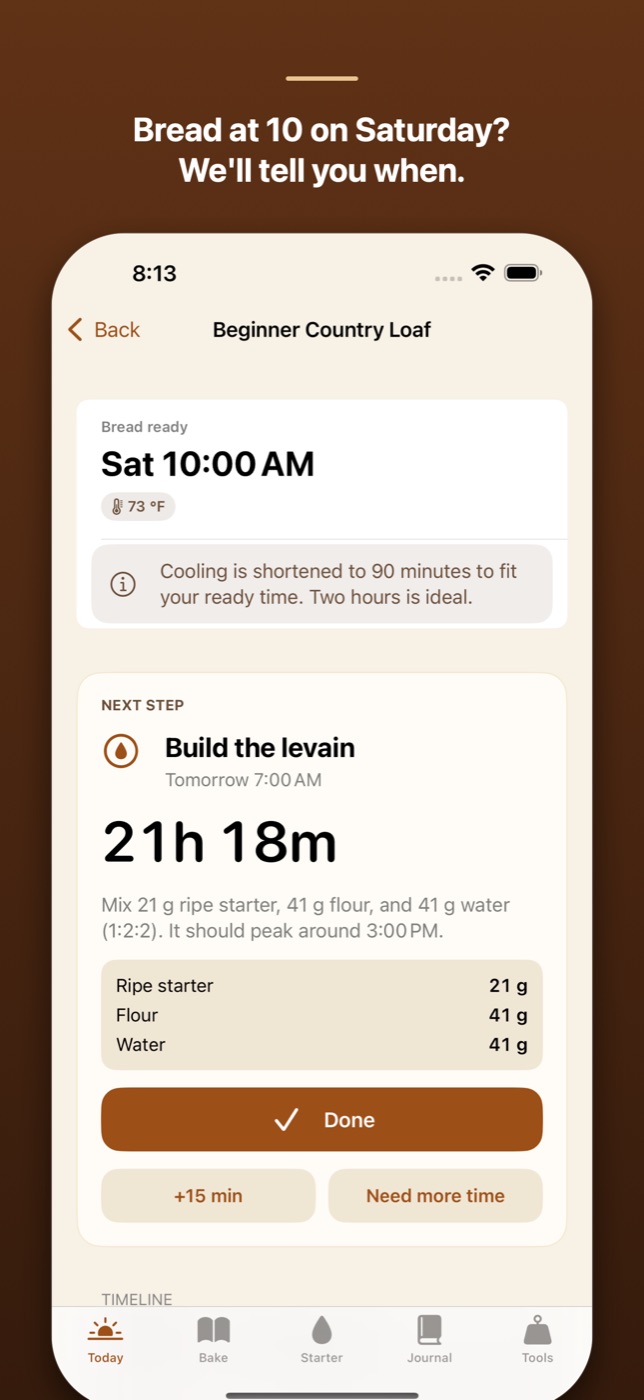
Quiet hours are the only window it protects, not your working hours, so read the preview before you start. Start now plans forwards instead.
How does kitchen temperature change a sourdough schedule?
Proofday's model assumes every 7 °C (about 13 °F) cooler roughly doubles fermentation time. From a 5-hour bulk at 24 °C (75 °F) with 20% levain, that gives:
| Kitchen | Bulk fermentation | Starter peak, 1:2:2 feed |
|---|---|---|
| 18 °C (64 °F) | about 9 h | about 12.5 h |
| 20 °C (68 °F) | about 7.5 h | about 10.5 h |
| 22 °C (72 °F) | about 6 h | about 8.5 h |
| 24 °C (75 °F) | about 5 h | about 7 h |
| 27 °C (81 °F) | about 3.5 h | about 5 h |
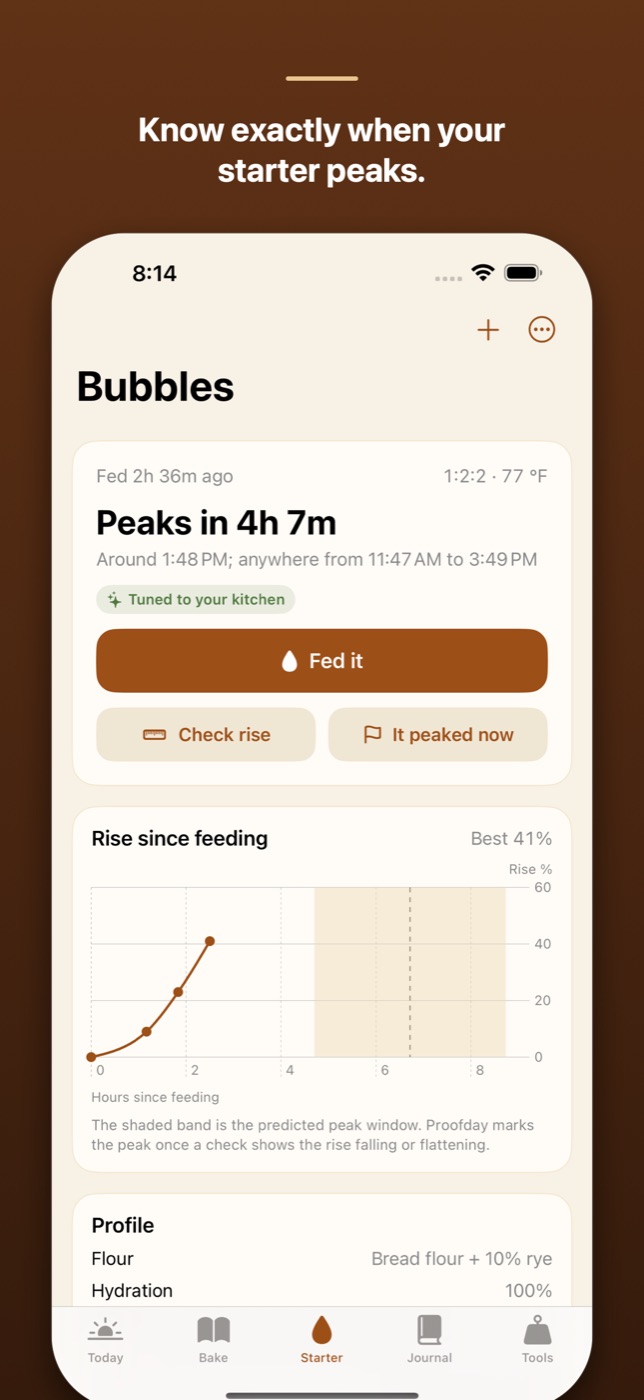
These are starting estimates, trusted between 16 and 30 °C (61 to 86 °F), and your logged bakes and starter peaks tune them.
The real signal is the dough. At mixing, a spoonful goes into a small jar, the aliquot, and you photograph its rise. The shaping target depends on dough temperature, 50% at 24 °C and 80% at 20 °C; when it's reached, Aliquot hit target re-plans the rest.
What reminds me during the bake?
- A notification for every step, with Done, +15 min and Snooze 5 min on the Lock Screen.
- A Live Activity with a countdown and Done and +15 min buttons. Because of iOS limits, it appears once you open Proofday within seven hours of the next step.
- A fold timer that keeps the screen awake and buzzes when a set is due.
- Two widgets: Next bake step and Starter peak.
- Need more time shifts the rest of the plan; the cold proof absorbs what it can, so the ready time often holds.
What does Proofday do with my data?
Starters, photos, plans, the journal and settings stay on your iPhone. There's no account, no ads, no usage analytics, no tracking and no sync; the data rides in your iCloud or computer backup and goes when you delete the app.
Two things leave the phone. A Crumb Check, an analysis of your crumb that you ask for after a bake, sends the cut-loaf photo and that bake's numbers to my server, which passes them to an AI model from Anthropic and stores none of it, keeping only an App Attest public key and daily counts for the rate limit. Under its terms, Anthropic doesn't train on API data and keeps requests only for a limited time. RevenueCat, which runs the subscriptions, gets the App Store's purchase record with a random ID. The App Store label lists photos, other user content and purchase history, all Data Not Linked to You. The privacy policy has the rest.
Who is Proofday for, and who isn't it for?
It's for bakers who want bread at a set time without the arithmetic, or want to know when a starter will peak. A 14-day program covers making a starter from scratch.
It isn't for you if:
- You want it free. The download and the setup quiz are free, and the quiz plans your first bake. After that it needs Proofday Pro: $39.99 a year with a 7-day free trial, or $6.99 a week (US prices).
- You're not on iPhone. It's built for iPhone, on iOS 17 or later, in English. No Android.
- You bake your own formula. Version 1.0 has no recipe editor; you plan from eight built-in recipes, from a country loaf to pizza and a gluten-free loaf.
- You trust the clock over the jar. It's a model. The dough has the final word.
How to get started
- Install Proofday from the App Store.
- Answer the setup quiz, including your kitchen temperature and quiet hours. It ends with a plan for your first bake.
- Allow notifications, then start the free trial or subscribe.
- Tap Plan a bake, choose a recipe, set the temperature and Bread ready at…, and switch on My starter is already ripe if it is.
- Check the preview, tap Start this plan, and add the Next bake step widget.
Questions go to the support page.
How it's built, for developers: Planning sourdough backwards in Swift, with quiet hours.
How it compares with Sourdough Planner, BreadMe, BackPlaner, Dough Timer and others: Sourdough planner apps that work back from bake time: 7 compared.
FAQ
How do I plan a sourdough bake around a work schedule?
Count back from when you want to eat: cooling, baking, cold proof, shaping, bulk, then the starter feed. The cold proof is the flexible part, so you can shape in the evening and bake the next day. Proofday does this count on iPhone, but it keeps steps out of your sleep, not your working hours.
When should I feed my starter to bake at a certain time?
So that it peaks when you mix. In Proofday's model, at 24 °C (75 °F) a starter peaks about 5 hours after a 1:1:1 feed, 7 after 1:2:2 and 11 after 1:5:5, and takes about half again as long at 20 °C (68 °F). It tunes to your starter after three logged peaks.
How long does bulk fermentation take at my kitchen temperature?
Proofday's model starts from 5 hours at 24 °C (75 °F) with 20% levain and roughly doubles that for every 7 °C (13 °F) cooler: about 6 hours at 22 °C, 7.5 at 20 °C and 9 at 18 °C. These are estimates; bulk is done when an aliquot jar reaches its target rise.
What's the earliest I can have sourdough bread in the morning?
With Proofday's default quiet hours, 11 PM to 7 AM, about 9:30 AM for a Dutch-oven loaf: 45 minutes of preheating from 7:00, 45 of baking and at least an hour of cooling. Ending quiet hours earlier allows earlier bread.
Is there a sourdough timer app that reminds me when to fold?
Yes. Proofday, for iPhone, sends a reminder for every fold and step with Done, +15 min and Snooze, counts down in a Live Activity, and has a fold timer that buzzes when a set is due.
Is Proofday free?
Proofday is free to download, and the setup quiz plans your first bake. After that it takes Proofday Pro: $39.99 a year after a 7-day free trial, or $6.99 a week with no trial (US prices).
More writing
Aquarium water test log apps for iPhone: 8 compared
Eight iPhone apps for logging aquarium water tests compared: freshwater or reef, test strip scanning, species database, account, and what each costs.
Free parking in Madrid, Barcelona and Valencia: 7 apps compared
Most Spanish parking apps help you pay, not park free. Seven apps compared for Madrid, Barcelona and Valencia, and which one maps free street parking.
Pet health record apps for iPhone: 7 compared
Seven iPhone apps for your pet's vaccinations, vet visits and documents compared: which work without your vet joining, store your own scans, and cost.